
The average person using AI at work now saves about 2.2 hours every week, and roughly one in three daily users saves four hours or more. That is the finding from the 2026 Microsoft Work Trend Index, and it reframes the whole conversation. The right AI productivity tools are no longer a novelty for early adopters. They are the difference between finishing Friday at 5 p.m. and finishing Friday at 8 p.m.
But here is the part most round-ups skip: those hours do not come from one magic app. Independent testing in 2026 keeps pointing to the same conclusion, the biggest time savings happen when a general AI assistant is paired with automation and smart scheduling, not when a single tool is used in isolation. This guide breaks down which AI productivity tools actually earn their keep, what each one is best at, and how to assemble a stack that fits real work.
What Counts as AI Productivity Tools
A useful definition: AI productivity tools are software that uses machine learning to do, draft, sort, or schedule work that a person would otherwise do by hand. A detailed 2026 analysis of 14 leading tools argues the category now splits cleanly into four jobs.
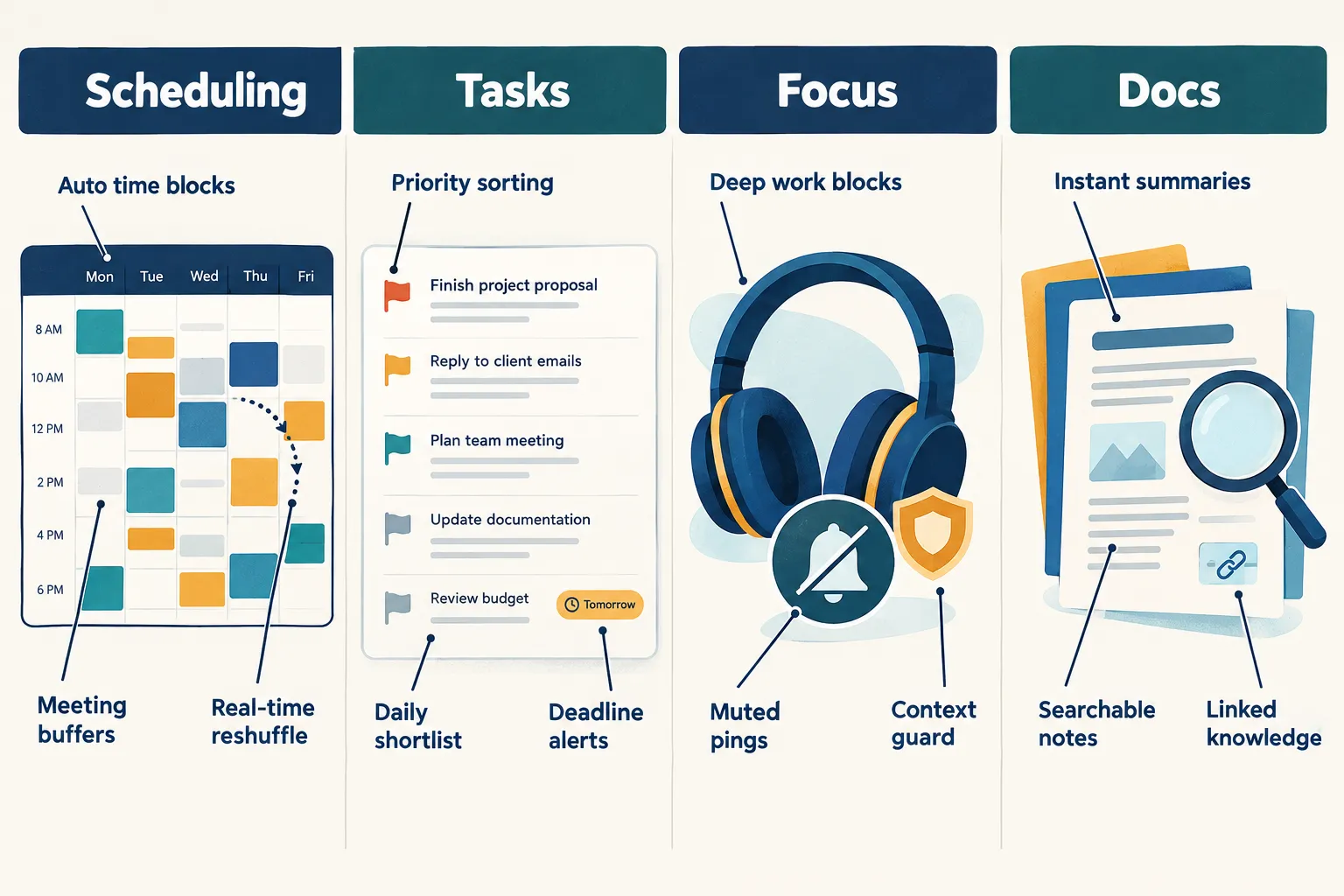
| Core Job | What It Solves | Standout Tools |
|---|---|---|
| Scheduling | Protecting time and rebuilding the calendar automatically | Motion, Reclaim.ai, Clockwise, Calendly |
| Tasks | Deciding what to do next, in what order | Todoist, Sunsama, ClickUp, Trello |
| Focus | Managing distractions and context-switching | Clockwise, Raycast AI, Superhuman |
| Docs and knowledge | Where work actually lives and gets found | Notion AI, Mem, NotebookLM, Evernote Teams |
Thinking in these four buckets prevents the most common mistake: buying five tools that all solve the same problem while the real bottleneck goes untouched. If a tool does not reduce decisions, keystrokes, or meetings, it is not a productivity tool. It is another tab.
The Best General-Purpose AI Assistants
Multiple 2026 round-ups agree that general-purpose assistants are the single most versatile category for saving time. They handle drafting, research, summarizing, coding help, and everyday thinking work.
ChatGPT
Repeatedly ranked “best overall” by independent testers. It is the default drafting and reasoning anchor for most knowledge workers, emails, outlines, first drafts, data cleanup, and quick analysis. Its breadth is the point.
Claude
Favored for long documents and nuanced writing. If the task involves a 40-page contract, a dense research report, or writing that needs to sound human, Claude is the common recommendation.
Google Gemini
Strongest when work already lives in Google Workspace. Drafting inside Docs, generating formulas in Sheets, and triaging Gmail happen without leaving the file. Its advantage shrinks outside that ecosystem.
Microsoft Copilot
The same logic in reverse. Deep integration with Microsoft 365 means Teams recaps, Excel analysis, and Outlook drafting all happen in place. For Microsoft-heavy organizations, it is often the lowest-friction choice.
Practical takeaway: pick one general assistant based on where files already live, then learn it deeply. Switching between three assistants wastes more time than it saves.
AI Productivity Tools for Scheduling and Task Management
This is where the clock-time savings become measurable, because the AI is making decisions instead of just producing text.
- Motion automatically schedules tasks around existing meetings and reshuffles in real time when something runs long. Its Pro AI plan sits at $19 per seat per month, with no free tier. For people whose days get wrecked by one surprise meeting, the automatic re-planning is the selling point.
- Reclaim.ai defends habits and recurring priorities, focus blocks, lunch, one-on-ones, and moves them rather than deleting them when conflicts appear.
- Clockwise optimizes team calendars to create shared blocks of uninterrupted time, which matters more than individual optimization in collaborative teams.
- Todoist and Sunsama handle the “what next” question. Sunsama in particular enforces a daily shortlist, which helps people who over-plan.
- ClickUp and Trello suit project managers who need AI summaries, status rollups, and automated task creation inside an existing board structure.
A Simple Rule for Choosing
- Calendar is the chaos point → start with Motion or Reclaim.ai
- Task list is the chaos point → start with Todoist or Sunsama
- Team coordination is the chaos point → start with ClickUp, Trello, or Clockwise
Automation: Where the Hours Actually Hide
G2’s 2026 testing of the top AI productivity tools ranked Zapier, Zoom Workplace, Workato, Matter, and TextExpander as leading performers, with automation platforms doing the heaviest lifting.
Zapier AI connects AI steps into workflows across more than 7,000 apps. A single automation can summarize an incoming email, update a CRM record, and trigger a follow-up message, work that previously took a person several minutes, several times a day. There is a free tier, with the Professional plan starting around $19.99 per month.
One caution reviewers raise consistently: Zapier’s model-tier pricing (1x to 5x task multipliers) can burn through task allowances faster than expected. Monitor usage in the first month so the cost does not quietly cancel out the savings.
Workato targets larger organizations with more complex, multi-system workflows. n8n appeals to teams that want self-hosting and more technical control.
TextExpander is the quiet overachiever. Snippets for repeated replies, clauses, and code blocks save seconds hundreds of times a week.
Automation beats assistance for anything done more than twice a week. Assistance beats automation for anything that needs judgment.
AI Productivity Tools for Meetings, Research, and Writing
Several 2026 reviews identify meeting transcription and summarization as the fastest, easiest time-saving use case available, low setup, immediate payoff.
Meetings
- Fireflies.ai, real-time transcription, searchable meeting archives, automated follow-up summaries, and connections into email, Slack, and CRM. Positioned less as a note-taker and more as an assistant that sits where business information already lives.
- Otter.ai, widely cited as best-in-class for straightforward transcription and shareable recaps.
- Granola, favored by people who want AI-enhanced personal meeting notes rather than full transcripts.
Research and Knowledge
- Perplexity AI, fast, sourced answers that replace long search sessions.
- NotebookLM, upload documents and interrogate them directly, excellent for reports, policies, and research bundles.
- Afforai and Elephas, AI search across personal and team files.
Writing and Content
- Grammarly, editing, tone adjustment, and clarity at speed.
- Jasper and Copy.ai, marketing copy at volume with brand consistency.
- Notion AI and Mem, notes that summarize, link, and resurface themselves.
Creative and Technical Work
- Canva Magic Studio and Adobe Firefly, fast on-brand visuals without a designer in the loop.
- Midjourney, concept and campaign imagery.
- GitHub Copilot and Cursor, code completion and refactoring for developers.
- Synthesia and ElevenLabs, video and voice production without studios.
- Power BI, Tableau AI, Zoho Analytics, natural-language questions against business data.
How to Build an AI Stack That Actually Saves Time
Independent 2026 testing points to a core stack rather than a long list: a general assistant for everyday work, a research tool, a document analyzer, a writing checker, plus automation and scheduling. Here is a practical four-week rollout.
- Week 1, Measure the leak: Track where hours disappear. Most people find the answer is meetings, email triage, status updates, or re-planning the day.
- Week 2, Add one assistant and one meeting tool: Choose a general assistant that matches the existing ecosystem, then turn on transcription for every recurring meeting. These two moves alone often account for the first hour saved per week.
- Week 3, Automate one repeated workflow: Pick a single task done daily. Build one Zapier or n8n automation for it. Resist building five.
- Week 4, Hand over the calendar: Add Motion or Reclaim.ai and let it schedule the task list. Expect a week of discomfort before the benefit shows.
Mistakes That Cancel Out the Savings
- Tool sprawl: Five overlapping subscriptions create more context-switching, not less.
- Ignoring where data lives: Tools inside email, chat, docs, and CRM outperform standalone apps because they remove the switch.
- No usage limits: Task-based and credit-based pricing can escalate quietly.
- Skipping review: AI drafts need a human pass, especially for client-facing or compliance work.
- Automating a broken process: Fix the workflow first, then automate it.
Final Thoughts
The data is consistent: AI productivity tools return real hours, but only to people who deploy them with intent. A general assistant without automation produces faster drafts and the same cluttered calendar. Automation without a clear bottleneck produces impressive workflows that solve nothing.
Three next steps, in order:
- Audit one week of work and name the single biggest time leak.
- Deploy two tools against that leak, one general assistant plus one specialist (meetings, automation, or scheduling).
- Review after 30 days and measure hours recovered, cost per seat, and whether the tool reduced switching or added to it.
Start narrow, measure honestly, and expand only when a tool proves it earned the hour back. That is how 2.2 hours a week becomes four or more.
Frequently Asked Questions
How much time can AI productivity tools realistically save?
Current workplace research puts the average at about 2.2 hours per week, with roughly 33.5% of daily generative AI users reporting four or more hours saved. Results depend heavily on how repetitive the work is.
Which single tool delivers the fastest payoff?
Meeting transcription. Tools like Fireflies.ai or Otter.ai require almost no setup and immediately remove note-taking and recap writing.
Are free plans enough?
Often yes for individuals. Zapier, Otter.ai, and most general assistants offer free tiers. Scheduling tools like Motion typically do not, and automation limits arrive quickly in team settings.
Do these tools replace project management software?
No. They sit on top of it. ClickUp, Trello, and Notion remain the system of record, while AI handles summarizing, sorting, and scheduling.