
A two-person bookkeeping firm in Ohio now answers customer emails, drafts proposals, and reconciles receipts using a software stack that costs less than a single part-time employee’s weekly wage. That is the quiet revolution happening across Main Street right now. The best AI tools for business are no longer locked behind enterprise contracts and six-figure implementation fees, most of them start free, and a fully equipped stack for a small team lands somewhere between $50 and $150 per month.
The hard part is not finding AI software. It is choosing the right five or six tools out of thousands and actually getting them to work together. This guide breaks down which tools matter by job function, what they realistically cost, and how to build a stack that pays for itself.
Why AI Tools for Business Finally Make Sense for Small Teams
Three things changed. First, prices collapsed. Tools that would have cost hundreds per seat a few years ago now start under $20 a month. Second, the tools got easier, no coding, no data scientist, no onboarding consultant. Third, they stopped being toys. A good AI assistant can now draft a usable client proposal, clean up a messy spreadsheet, or handle a routine support ticket without a human rewriting everything.
The question for a small business in 2026 is no longer “should we use AI?” It is “which three hours of weekly busywork do we kill first?”
That shift matters because small businesses do not have slack in the system. When the owner is also the marketer, the bookkeeper, and the customer service rep, saving four hours a week is not a nice-to-have. It is the difference between growing and stalling.
The Best AI Tools for Business, Organized by Job
Rather than ranking tools against each other, it helps to match them to the work you actually need done. Below are the categories that deliver the fastest payback.
General AI Assistants
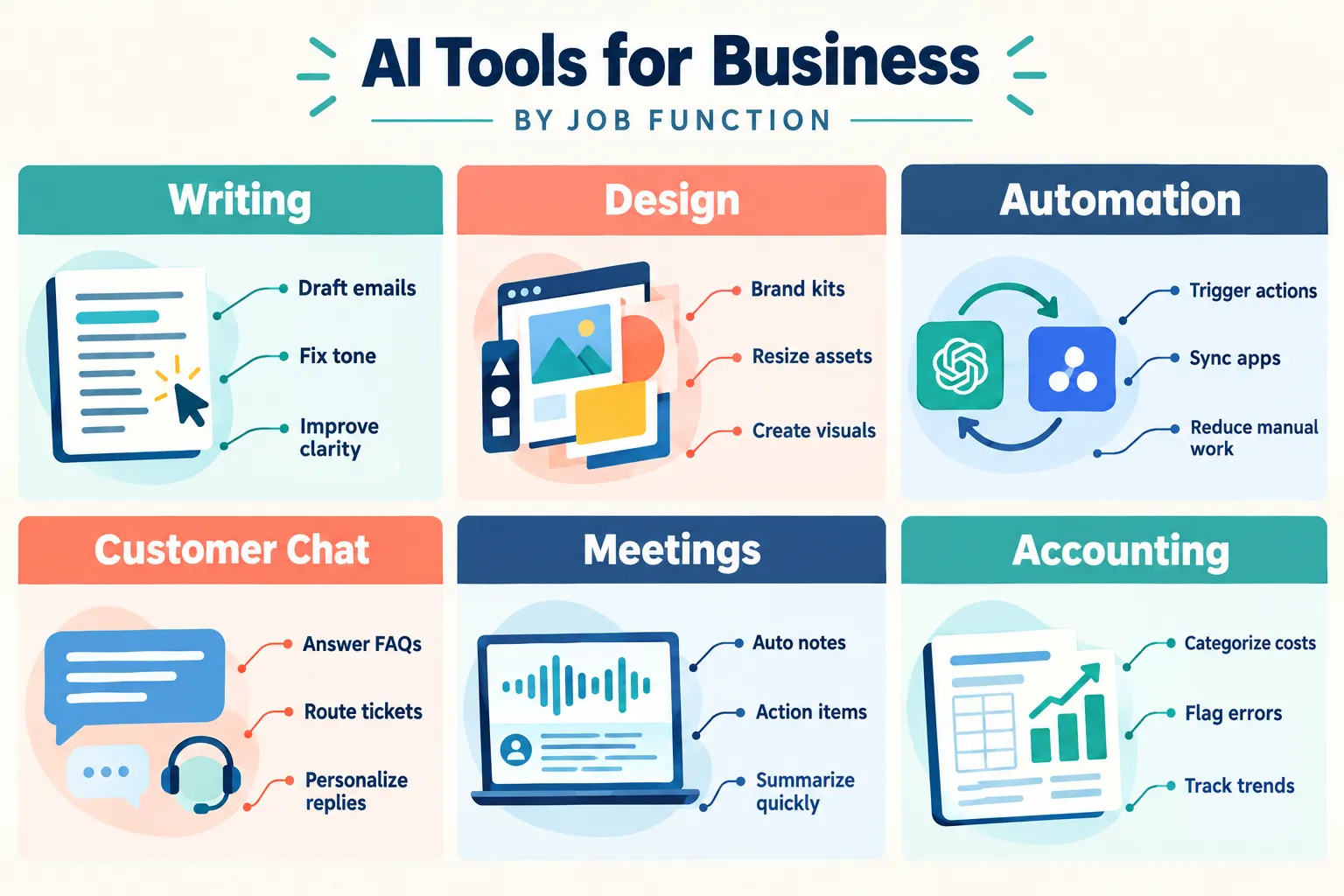
These are the workhorses. ChatGPT and Claude handle drafting, summarizing, brainstorming, research, data cleanup, and answering “how do I…” questions all day long. Paid plans typically run around $20 per user per month, and both offer capable free tiers.
Best use: Writing first drafts, rewriting content for different audiences, summarizing long documents, and thinking through decisions out loud.
Writing and Editing
Grammarly remains the default for catching errors and adjusting tone across email, proposals, and web copy. Jasper leans more toward marketing output, ad copy, landing pages, and campaign variations built on brand guidelines. Both sit in the mid-teens to high-$30s per user monthly band.
Design and Visual Content
Canva’s Magic Studio is arguably the highest-value AI purchase for a small business with no designer. Background removal, text-to-image, instant resizing for every social platform, and brand kits that keep everything consistent. Around $15 a month, with a generous free tier.
For video, HeyGen generates spokesperson-style clips from a script. It is free for a small number of videos, then roughly $24 monthly, attractive for agencies and online shops that need steady short-form content.
Workflow Automation
Zapier is the connective tissue. It links the apps you already pay for so data moves automatically: a new form submission creates a CRM contact, triggers a welcome email, and posts to Slack. Microsoft Power Automate plays the same role inside the Microsoft ecosystem.
Best use: Eliminating copy-paste between tools. Start with one annoying manual process and automate just that.
Customer Support and Chat
Tidio and Intercom add AI chat layers to websites, deflecting routine questions and routing the rest to a human. Aissist.io is notable for a free tier covering roughly 3,000 interactions per month, then usage-based pricing, unusually friendly for low-volume service businesses.
Meetings and Notes
Otter and Fireflies join calls, transcribe them, and produce summaries with action items. Fireflies Pro runs about $18 monthly. For anyone doing client discovery calls, this pays for itself the first week.
Accounting and Operations
QuickBooks now layers AI on top of core bookkeeping, transaction categorization, anomaly flagging, and cash-flow forecasting. Ajelix handles spreadsheet work, generating formulas and explaining broken ones in plain English.
CRM and Customer Data
folk CRM and HubSpot Starter both bring AI enrichment, automated follow-up suggestions, and email drafting into lightweight pipelines. Pricing typically sits between roughly $7 and $39 per user monthly on annual billing.
Documentation and Project Management
Notion AI sits inside the workspace where your docs and tasks already live, summarizing meeting notes, generating project briefs, and answering questions about your own internal content. Motion takes a different angle, using AI to rebuild your calendar and task list automatically as priorities shift.
What AI Tools for Business Actually Cost
Here is the realistic picture based on current market pricing.
| Category | Typical Tools | Common Price Band (per user/month) |
|---|---|---|
| General assistant | ChatGPT, Claude | Free to $20 |
| Writing | Grammarly, Jasper | $14 to $39 |
| Design and video | Canva Magic Studio, HeyGen | Free to $24 |
| Automation | Zapier, Power Automate | $20 to $50 |
| Support chat | Tidio, Intercom, Aissist.io | Free to $39 |
| Meetings | Otter, Fireflies | $10 to $20 |
| CRM | folk, HubSpot Starter | $7 to $39 |
| Office productivity | Microsoft 365 Copilot | $30 to $59 |
Most mainstream business AI products cluster between $12 and $59 per user per month on annual plans. Two patterns are worth knowing:
- Annual billing saves 15 to 25 percent: Once you are confident a tool is sticking, switch.
- Usage-based pricing is spreading: Support and video tools increasingly charge by interactions or minutes, which favors low-volume businesses.
A sample “fully equipped” stack for a small team, a general assistant at around $20, a design tool near $15, a workspace tool around $10, a meeting assistant near $18, and a no-code automation builder around $20, lands at roughly $83 a month. Add seats and a CRM, and most small teams stay under $150 monthly.
The All-in-One Option Worth Watching
In late September 2026, Meta launched Muse for Small Business, an AI agent built specifically for small operators. Rather than being another chat window, Muse connects to the tools small businesses already run, Shopify, QuickBooks, Stripe, Canva, Dropbox, Slack, Asana, Notion, Zoom, plus Meta’s own advertising and social platforms, and helps execute marketing, operations, and customer engagement tasks across them.
It is free up to a usage limit, with paid tiers in the $20 to $100 per month range for heavier use. That positioning matters: it is the clearest sign yet that vendors see small businesses as a core market, not an afterthought.
Analysts expect more bundling and consolidation through 2027, which should push effective per-user costs down while integration between tools gets deeper. For buyers, the practical takeaway is to avoid long multi-year commitments on any single platform right now.
How to Build Your Starter Stack
Resist the urge to buy everything. The most common failure mode is subscribing to nine tools and using two.
- Step 1, Audit your week: For five business days, write down every task that feels repetitive. Be specific: “retyping invoice details,” not “admin.”
- Step 2, Pick the top three pain points: Rank by hours lost, not by how interesting the tool looks.
- Step 3, Start with free tiers only: Run each candidate on real work for two weeks. If it does not change your actual workflow, it is not the tool.
- Step 4, Add automation last: Zapier is powerful but only valuable once you know which apps hold your important data.
- Step 5, Measure in hours, then dollars: If a $20 tool saves three hours a month, the math works at almost any hourly rate.
A sensible first stack for most small businesses:
- One general assistant (ChatGPT or Claude)
- Canva for all visual assets
- Grammarly for anything customer-facing
- A lightweight CRM (folk or HubSpot Starter)
- Zapier once two or more tools need to talk
- A meeting assistant if you run client calls
That is five to six tools, well under $150 a month for a small team.
Mistakes That Waste Money
- Buying by hype instead of by bottleneck. The best tool for a competitor may be useless for you.
- Skipping the trial. Nearly everything offers one. Use it on live work, not test prompts.
- Ignoring integration. A tool that cannot connect to your existing systems creates manual work rather than removing it.
- Paying for unused seats. Review your subscription list quarterly and cut anything untouched for 30 days.
- Treating output as final. AI drafts still need a human review pass, especially for pricing, legal language, and client communication.
Final Thoughts
The affordability problem is solved. The best AI tools for business now cost less per month than a single business lunch, and nearly all of them let you prove value before paying. What remains is discipline, choosing a small number of tools that attack your real bottlenecks and committing to using them properly.
Your next steps are straightforward. Track your repetitive tasks for one week. Pick the three that cost you the most time. Sign up for free tiers of the matching tools and run them on actual work for fourteen days. Keep what sticks, cancel what does not, and switch survivors to annual billing to capture the discount. Then review the stack every quarter. The market is moving fast, bundles are coming, and the business that stays flexible will keep paying less for more.
Frequently Asked Questions
Do small businesses really need paid AI tools?
Not immediately. Free tiers of ChatGPT, Canva, and Claude handle a surprising amount of work. Upgrade when you hit usage limits or need features like brand kits and team sharing.
What is a reasonable monthly AI budget?
Most small teams land between $50 and $150 per month for a complete stack. Solo operators can often stay under $50.
Which single tool gives the biggest return?
For most businesses, a general AI assistant. It touches writing, research, planning, and analysis all at once, making it the easiest purchase to justify.
Is AI safe for customer data?
Check each vendor’s data-use policy and look for business plans that exclude your inputs from model training. Never paste sensitive financial or health records into a free consumer tier.