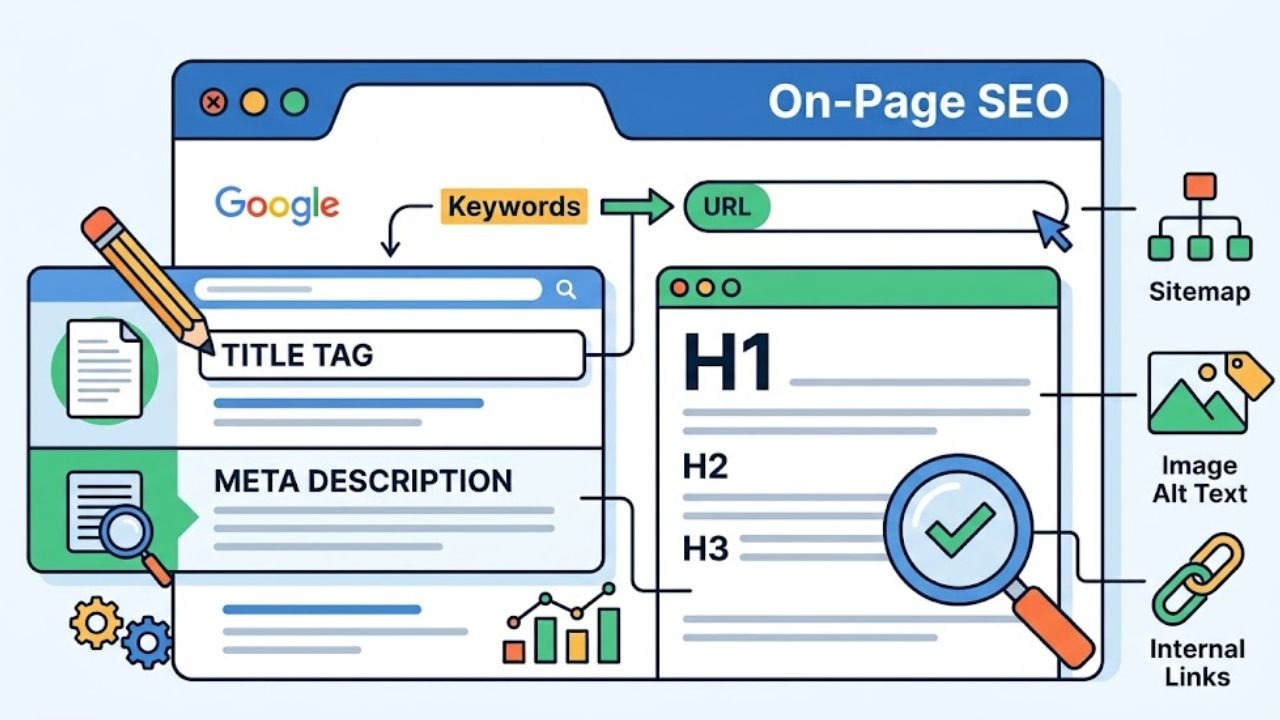
Google updated its official SEO Starter Guide in September 2026, and the core message has not changed in years: help search engines understand your content, and help people use your pages. That is the whole job. This On-Page SEO Complete Guide breaks that simple idea into the exact page-level changes that move rankings, titles, headings, intent, internal links, images, and page speed, plus a new twist for 2026: your pages now need to be readable by AI assistants that quote sources, not just by crawlers that index them.
Here is the surprising part. Most pages that fail in search do not fail because of a technical error. They fail because they try to answer four different questions at once, so they answer none of them well.
What On-Page SEO Actually Means
On-page SEO is the set of improvements made inside a page and its HTML to boost relevance and visibility. It covers everything you control directly: the words on the page, the tags that describe them, the images, the links, and how fast the page loads.
It helps to see where it sits among the three pillars of search:
| Pillar | What it covers | Who controls it |
|---|---|---|
| On-page SEO | Content, titles, headings, images, internal links, structured data | You, fully |
| Technical SEO | Crawling, indexing, site speed, sitemaps, HTTPS | You, with developer help |
| Off-page SEO | Backlinks, mentions, brand reputation | Mostly others |
Google Search Essentials, refreshed in October 2026, puts the foundation plainly: create helpful, reliable, people-first content. Every tactic below is a way of making that content easier to find and easier to trust.
On-page SEO is not about tricking a search engine. It is about removing every reason for a search engine, or an AI assistant, to misunderstand your page.
Start With Search Intent, Not Keywords
Keyword research tells you what people type. Search intent tells you what they actually want. Getting intent wrong is the most expensive on-page mistake, because no amount of tag tweaking fixes a page that answers the wrong question.
There are four common intent types:
- Informational, “what is on-page seo” (wants an explanation)
- Navigational, “google search console login” (wants a specific destination)
- Commercial, “best seo audit tools” (wants to compare)
- Transactional, “hire seo consultant” (wants to act)
How to confirm intent in five minutes:
- Search your target keyword in an incognito window.
- Look at the top ten results. Are they guides, product pages, listicles, or tools?
- Note the format that dominates. That is the format Google has decided satisfies the query.
- Check the “People also ask” box for subtopics you must cover.
- Match the dominant format, then add something the others missed.
The expert consensus across 2026 guides is consistent: give each page one main intent. If a page tries to teach beginners, compare tools, and sell a service, split it into three pages.
The On-Page SEO Complete Guide to Content Optimization
Content is the largest ranking lever you control, and the rules are simpler than most people expect.
Answer the question first
Put the direct answer to the core query in the opening paragraph, ideally in the first two or three sentences. This serves three audiences at once: readers who want a quick answer, crawlers that weigh early content more heavily, and AI systems that extract short passages to cite.
Cover the topic, not just the keyword
Modern search engines understand topics through related terms. A page about on-page SEO should naturally mention title tags, meta descriptions, heading structure, alt text, internal linking, and Core Web Vitals. These semantic variations signal depth without keyword stuffing.
Use keywords naturally
Aim for a natural density of roughly one to two percent. Include the primary keyword in:
- The H1 title
- The first paragraph
- Two or three subheadings where it fits
- The URL slug
- Image alt text, where accurate
If a phrase feels forced when read aloud, remove it.
Build in E-E-A-T signals
Experience, expertise, authoritativeness, and trust used to be site-wide concerns. In 2026 checklists, they live on the page itself:
- A visible author name with real credentials
- A clear “last updated” date
- Links to primary sources and official documentation
- First-hand examples, screenshots, or original data
- Contact information and a plain-language disclosure where relevant
Title Tags, Meta Descriptions, and URLs
These three elements shape how your page appears in search results and strongly influence click-through rate.
| Element | Best practice | Common mistake |
|---|---|---|
| Title tag | 60 characters or fewer, target keyword near the front, unique across the site | Duplicate titles, brand name first |
| URL slug | Short, lowercase, hyphenated, descriptive | Dates, numbers, random strings |
A quick remediation routine used by fast on-page checklists:
- Confirm every title is unique and within the character limit.
- Rewrite weak or missing meta descriptions so each one makes a promise the page keeps.
- Shorten URLs that contain more than four or five words.
Google may rewrite your meta description, and that is fine. A well-written one still wins more clicks on average than none at all.
Heading Structure and Readability
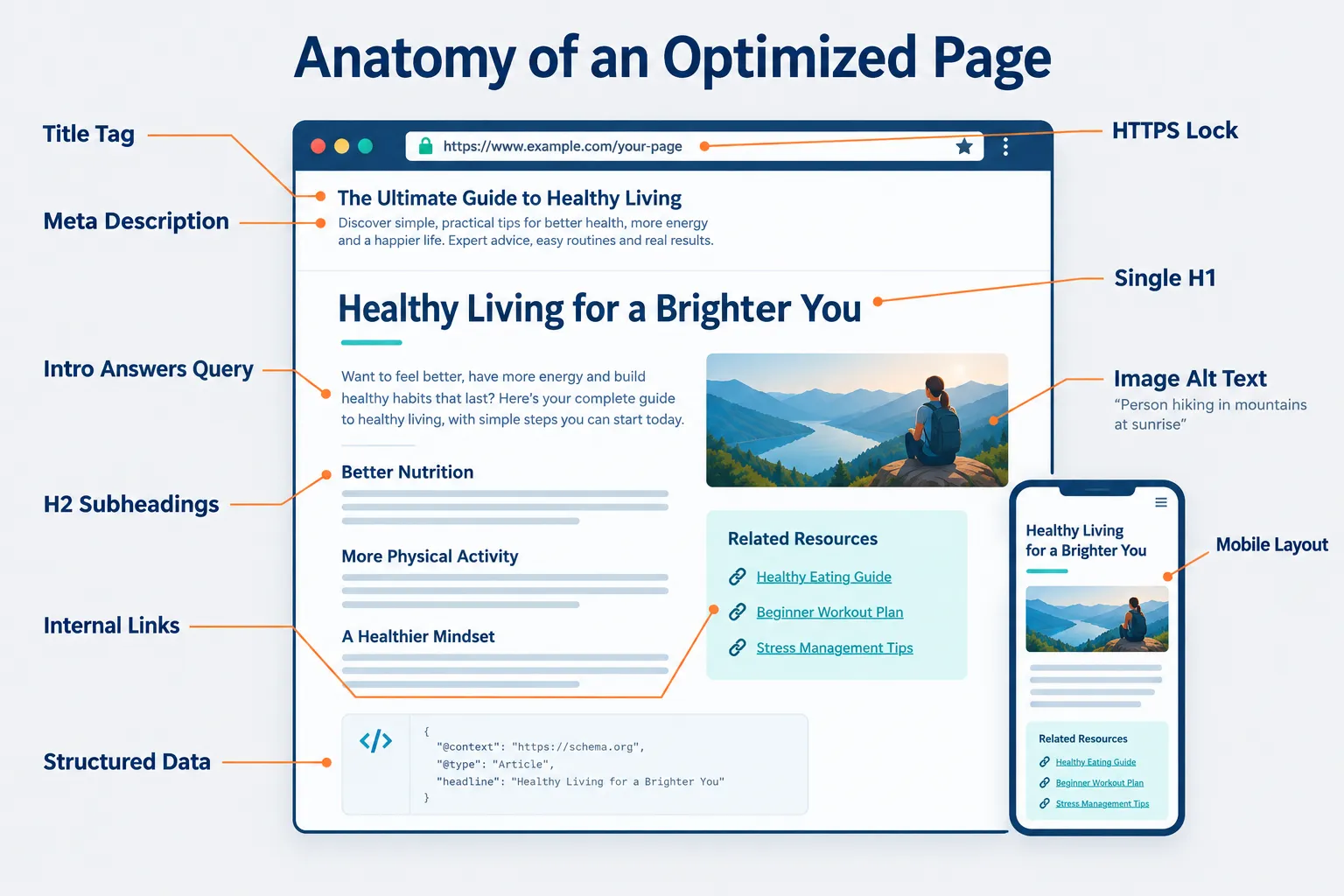
Headings are the skeleton of your page. Crawlers and AI assistants use them to map topics and subtopics, and readers use them to scan.
The rules are short:
- Use exactly one H1 per page, and make it match the page’s main topic.
- Nest headings in order: H2 under H1, H3 under H2. Never skip levels for styling.
- Write descriptive headings, not clever ones. “How Internal Links Work” beats “Connecting the Dots.”
- Keep sections short, roughly 150 to 300 words, with a clear takeaway each.
For readability, short sentences and plain words win. Break up long passages with bullet lists, tables, and bolded key terms. A page that is easy to skim keeps visitors longer, and engagement signals support rankings indirectly.
Images, Internal Links, and Structured Data
Image optimization
- Compress every image and use modern formats like WebP or AVIF.
- Write descriptive alt text for meaningful images; leave alt empty for purely decorative ones.
- Use descriptive file names (
on-page-seo-checklist.webp, notIMG_4471.jpg). - Set explicit width and height attributes to prevent layout shift.
Internal linking
Internal links spread authority and help crawlers discover pages. Mainstream 2026 guidance recommends three to five internal links per URL, using descriptive anchor text rather than “click here.”
Two checks worth running monthly:
- Count internal links pointing to each important page, not just out of it.
- Find orphan pages, URLs with no internal links at all, and connect them to a relevant hub.
Structured data
Schema markup tells search engines explicitly what your page is: an article, a recipe, a product, a FAQ. It does not guarantee rich results, but it makes eligibility possible and helps AI systems parse your content accurately. Start with Article or Organization schema, validate it, and expand only where it genuinely applies.
Page Experience: The On-Page SEO Complete Guide to Speed and Usability
Page experience is no longer a technical afterthought. Google Search Central’s 2026 fundamentals tie technical and on-page work together as prerequisites for visibility.
Core Web Vitals to watch:
| Metric | What it measures | Target |
|---|---|---|
| LCP (Largest Contentful Paint) | Loading speed of the main content | Under 2.5 seconds |
| INP (Interaction to Next Paint) | Responsiveness to clicks and taps | Under 200 milliseconds |
| CLS (Cumulative Layout Shift) | Visual stability while loading | Under 0.1 |
Beyond the metrics, confirm the basics: the page loads over HTTPS, text is readable on a phone without zooming, buttons are easy to tap, and no intrusive pop-up blocks the content on mobile.
Optimizing for AI Search and Citations
This is the newest layer of on-page work. AI assistants and AI overviews do not just rank pages, they extract passages and cite sources. Pages built for extraction win mentions.
What makes a page AI-friendly:
- A clear, direct answer in the opening lines
- Descriptive headings phrased close to how people ask questions
- Short, self-contained paragraphs that make sense out of context
- Definitions, lists, and tables that can be lifted cleanly
- Factual claims attributed to named, credible sources
- Valid structured data describing the page type
The useful insight: nearly everything that helps an AI system quote you also helps a human skimmer and a crawler. Good structure is universal.
A Practical On-Page SEO Complete Guide Checklist
Work through this list for any single page before publishing or during a refresh.
Content
- One clear search intent identified and matched
- Core query answered in the first paragraph
- Topic covered in depth with related terms
- Author, date, and sources visible
HTML elements
- Unique title tag, 60 characters or fewer
- Meta description, 150 characters or fewer
- One H1, clean H2 and H3 nesting
- Short, descriptive URL slug
Media and links
- Images compressed, named, and given alt text
- Three to five relevant internal links added
- At least one outbound link to an authoritative source
- No broken links
Technical and experience
- HTTPS enabled
- Mobile layout verified on a real device
- Core Web Vitals in the green
- Page indexable and submitted in your sitemap
Structured data
- Appropriate schema type applied and validated
Final Thoughts
On-page SEO rewards discipline more than cleverness. The pages that climb are the ones that pick one question, answer it immediately, structure the answer so anyone can follow it, and load fast enough that nobody leaves before reading it. Every element in this On-Page SEO Complete Guide serves that goal.