Most people trying to launch an AI product fall into one of two traps. Non-technical creators buy white-label software, rebrand a basic chat interface, and wonder why nobody pays $20 a month for it. Meanwhile, developers spend months building custom infrastructure—setting up vector databases and complex backends—before checking whether anyone actually needs the tool.
Low-code platforms offer a practical middle ground. By combining logic builders, API connectors, and modern language models, you can build functional software tools in a weekend.
Calling this process completely “passive” is misleading, however. While an automated tool can handle user requests and collect subscriptions around the clock, creating sustainable income from AI side hustle projects requires initial validation, cost control, and ongoing system maintenance.
Generating reliable revenue means packaging AI capabilities into a focused utility that solves a distinct, repetitive operational task for an audience that already has a budget for software.
What Makes an AI Tool Monetizable?
The internet does not need another generic wrapper around ChatGPT. Free chat interfaces are universally accessible, so a basic prompt box offers no real commercial value. Users will pay for software that offers a workflow, not a raw model.
+———————————————————————–+
| Monetizable AI Architecture |
| |
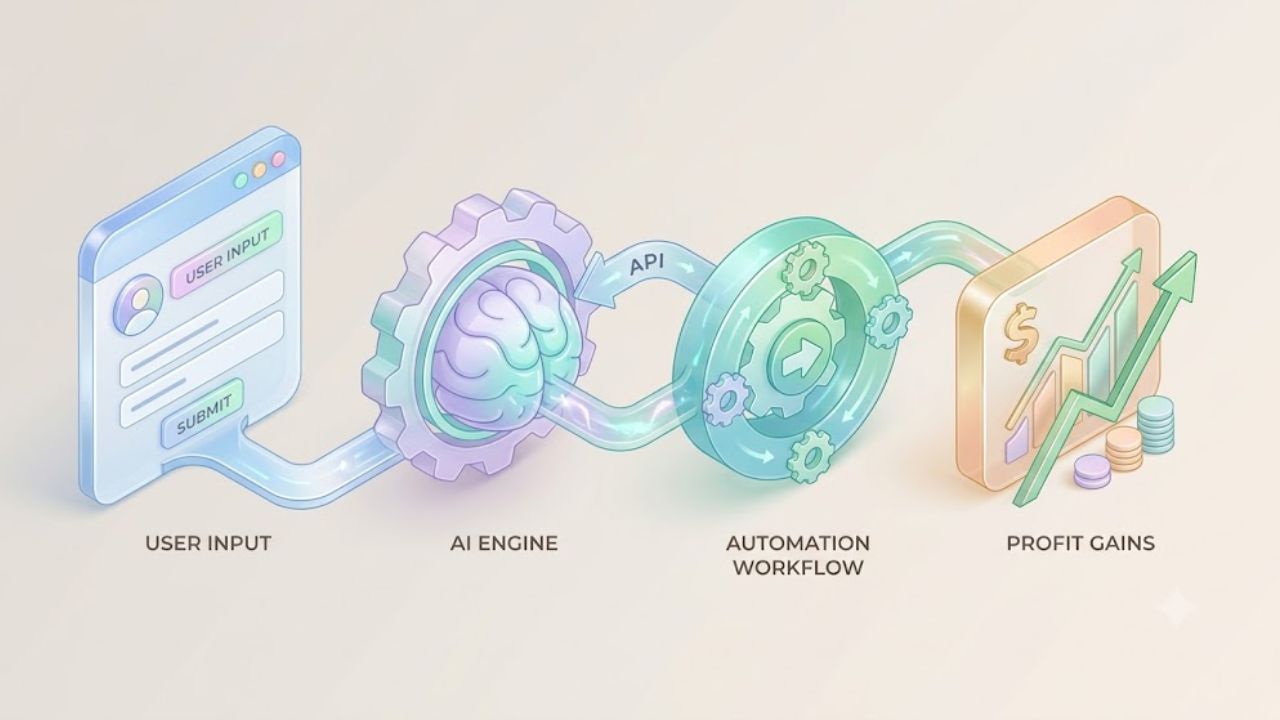
| [ User Input ] —> [ Structured Prompt / Logic ] —> [ AI ] |
| (Form/Upload) (Your Business Logic) (API) |
| | |
| v |
| [ Formatted Output ]
| (PDF/JSON/Email)
+———————————————————————–+
Successful micro-SaaS tools typically deliver value through three methods. The first is a structured workflow, where your app collects inputs through a form, processes them, and delivers a polished output like a PDF report or CSV export. The second is context retrieval (RAG), where the model connects to proprietary data (real estate records, technical manuals) to provide accurate answers.
Lastly, and often most profitably, are multi-step automations. Here, the AI output triggers secondary actions, such as updating a CRM row, sending a Slack notification, or generating an invoice. In these cases, users are not paying for the AI; they are paying for saved time and clean system integrations.
Selecting Your Low-Code AI Stack
Building without raw code does not mean working without a blueprint. You need four fundamental layers: a frontend interface, an automation engine, an AI provider, and a payment gateway.
Frontend App Builders
- Softr: This is the ideal choice if your app relies heavily on database records stored in Airtable or Google Sheets. It lets you build member portals, client dashboards, and gated directory sites in hours. It’s the faster path for a rapid MVP, but offers limited flexibility for custom user interactions.
- Bubble: The standard choice for building complex web applications. It supports custom logic, user authentication, and deep API integrations. The trade-off is a steeper learning curve and platform-specific charges as your database grows.
- FlutterFlow: Best if you want a native mobile app alongside a web app. It prevents vendor lock-in by exporting clean Flutter code, but requires an understanding of application state management.
Automation Engines & Connectors
- Make.com: The visual scenario builder is excellent for routing data between forms, databases, and AI endpoints. It includes robust built-in JSON parsing tools to clean up model responses. Editorial Note: While the base plan is inexpensive, costs can grow quickly if your workflows involve many automated steps.
- n8n: A powerful alternative that is more useful if you have extremely high volumes of data. You can self-host it on a cheap cloud server (like DigitalOcean or Hetzner) to bypass per-task execution fees entirely.
5 Validated Low-Code AI Project Models
1. Niche Document Processors
Businesses spend hundreds of hours manually extracting information from unstructured documents like invoices, PDF leases, and job applications. You can build a tool on Softr and Make.com that allows a user to upload a PDF, sends the file to a Vision API or OCR parser, formats the extracted data into JSON, and pushes it directly into the user’s database.
- Target Audience: Property managers, freelance bookkeepers, legal assistants.
- Monetization: Usage-based tiers (for example, $29/month for up to 100 parsed documents).
2. Specialized RAG Chatbots
A generic support bot is useless, but a bot trained strictly on a local company’s service menus, pricing schedules, and FAQ pages offers immediate value. By connecting the bot to scheduling platforms like Calendly, it can book appointments directly on the site.
3. Programmatic Content Repurposing Engines
Marketers need to adapt one piece of media into multiple formats—turning a video transcript into a LinkedIn article, a newsletter section, and an X thread. You can build a Bubble app that accepts a video link, runs it through sequential prompt templates, and outputs cleanly formatted posts across multiple platforms.
4. Custom AI Agent Workflows
Unlike single-prompt tools, an agent executes tasks in sequence. A real estate research agent could accept a zip code, scrape public property records, summarize market trends, generate a PDF report, and email it to the user. You can construct these logic branches visually using platforms like Langflow or Flowise alongside low-code webhooks.
5. AI-Enhanced Micro-Vertical Directories
Static business directories struggle. An AI-enhanced directory (e.g., “Find a mid-century modern interior designer in Austin who works under a $10,000 budget”) uses vector search rather than keyword matching to connect visitors with relevant listings, justifying monetization via featured fees or affiliate commissions.
Step-by-Step: Building an AI Tool in 48 Hours
To avoid over-engineering, follow a strict 48-hour development schedule to get your MVP into the market.
- Step 1: Sanitize Prompt Logic (Day 1: Morning) Before building an interface, open the developer playground for your AI provider. Craft system instructions that specify output format, tone, and strict limits. You must mandate structured responses (like clean JSON) rather than conversational prose so your low-code platform can easily parse the data.
- Step 2: Assemble the UI (Day 1: Afternoon) Keep the first version simple. Build a clean web form with necessary fields (text input, file upload, drop-down) and a single submit button. Avoid adding secondary screens or multi-theme options.
- Step 3: Wire the Logic Pipeline (Day 2: Morning) In your automation tool (like Make.com), set up a Webhook Trigger to receive data instantly upon form submission. Add an HTTP module that forwards the input to your AI endpoint. Parse the returned JSON payload and update your application’s database (Airtable or Supabase).
- Step 4: Monetization and Rate Limits (Day 2: Afternoon) Connect Stripe or Lemon Squeezy to handle billing. This is critical: you must set explicit usage caps per user tier. Unlimited API access on a flat monthly subscription invites abuse and will lead to unexpectedly massive API bills.
Managing Expenses and API Profit Margins
The main financial risk with software built on external APIs is unmanaged variable costs. Unlike traditional software, every user request processed by a model incurs a token charge.
+————————————————————————–+
| Token Cost vs. Retail Pricing |
| |
| [ Average User Request ] = 1,500 Input Tokens + 500 Output Tokens |
| [ Estimated API Cost ] = ~$0.00055 per run (gpt-4o-mini rates) |
| [ 100 Executions / Mo ] = ~$0.06 Raw Infrastructure Expense |
| [ Retail Price Charged ] = $19.00 / Month |
| |
| –> Gross Margin: ~98%+ (Excluding platform subscription fees) |
+————————————————————————–+
To protect your margins, select the right model tier. Do not use expensive flagship models like GPT-4o for simple data extraction when lighter models (GPT-4o-mini or Claude 3 Haiku) deliver the same result at a fraction of the cost. Implement character limits on inputs to prevent users from consuming thousands of tokens with a single past-and-submit operation.
What to Fix First When Your App Fails
When a low-code workflow breaks, the issue is usually data formatting, not server outages.
- Check the Webhook Payload: Verify that the data coming from your frontend form matches the exact field names expected by your automation scenario.
- Inspect the JSON Structure: AI outputs can occasionally include unescaped quotation marks or broken brackets that disrupt the JSON structure. A parsing error is rarely the model failing; it’s almost always a formatting issue. Add a JSON validation step before database insertion.
- Error Code 429: This means you have hit rate limits or ran out of credits on your AI provider account. An error code 401 indicates an invalid API key.
Final Thoughts
The real value of building AI side hustle projects with low-code tools is not instant passive income. It is the ability to validate software ideas rapidly without spending months writing background code.
Success comes down to solving a routine task for a specific target audience, keeping your tech stack lean, and managing token costs. Pick a narrow business problem, map the workflow logic, deploy a clean MVP over a weekend, and let real user feedback guide your updates.