A single text prompt can now produce a magazine-ready product shot in under ten seconds, and the tool that does it best changes roughly every quarter. That churn is exactly why choosing between AI image generators has become harder, not easier.
Expert reviewers who once crowned a single winner now agree on something more useful: as of late 2026, there is no single “best” generator. There are category leaders, and the right pick depends entirely on whether the goal is raw accuracy, artistic flair, legal safety, or zero cost per image.
This guide breaks down the tools worth testing right now, what each one actually leads at, and how to pick without wasting a month of trial subscriptions.
How AI Image Generators Differ in 2026
Every tool on this list converts text into pictures, but the way they get there, and what they optimize for, splits them into distinct camps. Understanding those camps saves far more time than reading another feature list.
Four dimensions matter most:
- Prompt adherence, does the image match what was actually asked for, including spelling, object counts, and spatial relationships?
- Aesthetic quality, does it look intentional and professional, or generically “AI”?
- Licensing and safety, can the output be used in a paid campaign without risk?
- Cost model, free with credits, flat subscription, or self-hosted and effectively free per image?
No tool leads in all four. The strongest workflows in 2026 use two or three generators, picking whichever fits the job.
Best AI Image Generators to Try Right Now
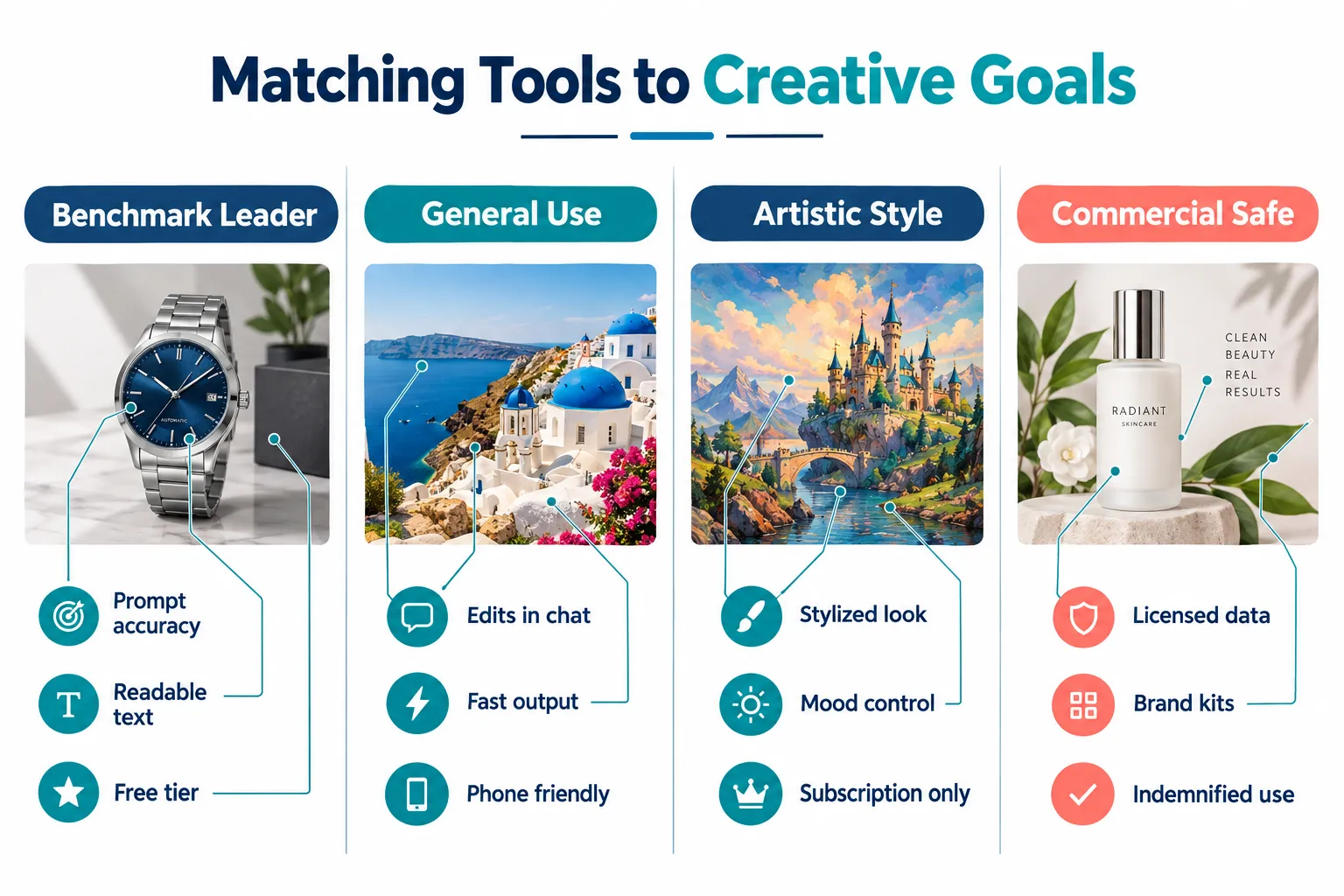
GPT Image 2.5 (via ChatGPT): Best Benchmark Performance
GPT Image 2.5 sits at the top of public leaderboards for image quality and prompt following. It is unusually good at the things older models fumbled: rendering legible text inside an image, handling long multi-part instructions, and keeping object counts correct.
Why it stands out:
- Strongest measured prompt accuracy of any widely available model
- Reliable in-image text, which matters for mockups, posters, and ad concepts
- Accessible through ChatGPT’s free tier, with higher limits on paid plans
- Conversational editing, describe a change in plain language instead of re-prompting from scratch
Best for: anyone who wants top-tier output without learning prompt syntax. It is the easiest recommendation for first-timers and the most defensible for professionals who need precision.
Watch out for: rate limits on the free tier, and a house style that can feel slightly polished or “safe” compared with Midjourney.
Google Gemini Nano Banana 2: Best Overall for General Use
If one tool had to cover most everyday needs, reviewers keep landing on Gemini’s Nano Banana 2. It is fast, forgiving with vague prompts, and excellent at editing an existing image rather than generating from zero.
Strengths:
- Exceptional image editing and object replacement inside existing photos
- Strong character and subject consistency across multiple generations
- Deep integration with Google Workspace, Search, and mobile apps
- Generous free access, which lowers the cost of experimenting
Best for marketers and content writers producing high volume across blogs, social posts, and slide decks. The speed-to-acceptable-result ratio is hard to beat.
Midjourney: Best for Artistic Visuals
Midjourney has lost its benchmark crown but kept its reputation. For illustration, concept art, editorial imagery, and anything that needs to look authored rather than generated, it remains the standard.
| Consideration | Detail |
|---|---|
| Core strength | Distinctive, highly aesthetic output |
| Control tools | Style references, character references, variation and remix modes |
| Access | Subscription only, no free tier |
| Learning curve | Moderate; rewards prompt craft and parameter use |
Best for graphic designers, art directors, and creators building a recognizable visual identity. Skip it if the main need is accurate text, product realism, or legally cleared commercial output.
Adobe Firefly: Best for Commercially Safe Output
Firefly’s advantage is not raw quality. It is paperwork. Adobe trains on licensed and public-domain material and offers indemnification for enterprise customers, which means in-house counsel will usually sign off on the output.
Key benefits:
- Indemnified, commercially safe generations for business use
- Native integration with Photoshop, Illustrator, and Express
- Brand kit features that lock colors, fonts, and style across a campaign
- Generative fill, expand, and vector generation in one ecosystem
Best for agencies, regulated industries, and any team where a licensing question could kill a launch.
Stable Diffusion 3.5 and FLUX-Style Open Models, Best for Advanced Users
Open-weight models are the quiet workhorses of 2026. Run locally on a capable GPU, they cost essentially nothing per image and impose no content or volume limits beyond the operator’s own rules.
What you gain:
- Near-zero marginal cost after hardware
- Full control through custom fine-tunes, LoRAs, and ControlNet-style guidance
- Complete privacy, images never leave the machine
- Batch generation at scale for product catalogs or dataset work
What it costs: setup time, a decent graphics card, and a willingness to troubleshoot. Output quality depends heavily on the model checkpoint and workflow chosen.
Best for technical creators, studios with repeatable pipelines, and anyone generating thousands of images a month.
Specialized and Emerging Tools Worth a Trial
A handful of newer paid tools are earning real traction in narrow lanes:
- Ideogram 4.0, still among the strongest for typography-heavy designs, logos, and posters.
- Higgsfield, popular for cinematic motion-adjacent visuals and stylized campaign assets.
- Soul 2.0, favored for photoreal human portraits and lifestyle imagery.
- Qwen-Image 2.1, competitive quality with strong multilingual prompt handling.
These are worth a single-month trial when a specific need appears, not as primary tools.
Comparing the Leading AI Image Generators
| Tool | Leads At | Access Model | Ideal User |
|---|---|---|---|
| GPT Image 2.5 (ChatGPT) | Benchmark accuracy, in-image text | Free tier plus paid plans | Everyone; precision work |
| Gemini Nano Banana 2 | General use, photo editing | Free plus paid tiers | Marketers, high-volume creators |
| Midjourney | Artistic, stylized visuals | Subscription only | Designers, illustrators |
| Adobe Firefly | Commercial safety, indemnity | Subscription / Creative Cloud | Agencies, enterprises |
| Stable Diffusion 3.5 / FLUX | Cost, control, privacy | Open source, self-hosted | Technical users, studios |
| Ideogram 4.0 | Text and typography in images | Paid plans | Poster and logo design |
Choosing the Right AI Image Generators for Your Work
Rather than testing everything, match the tool to the constraint that matters most. Start with the free options. ChatGPT and Gemini both offer enough free generation to judge quality honestly. Run the same three prompts through each and compare. One should feel noticeably better for the kind of work being produced.
Then ask three questions:
- Will this image be used commercially? If yes, and the brand is risk-aver, Firefly belongs in the stack.
- Does the output need a distinctive artistic voice? If yes, budget for Midjourney.
- Will monthly volume exceed a few hundred images? If yes, a local open model will pay for itself quickly.
A Practical Testing Routine
Use one consistent benchmark prompt set across every tool:
- A photoreal product shot with specific lighting and a visible label
- A human portrait with a named emotion and setting
- A text-heavy design, such as a poster headline with an exact phrase
- An edit task, change one object in an existing image
Score each on accuracy, usability, and how many retries were needed. Four prompts across three tools takes under an hour and settles the decision better than any review.
What to Expect Over the Next Year
Three trends look reasonably safe to bet on. Benchmark leadership will likely stay with GPT Image 2.5-class models and their immediate successors. OpenAI’s iteration pace gives it a structural advantage, though the gap is narrow enough that any quarter could flip it.
Competition will shift toward integration rather than raw scores. Google’s Nano Banana line, Grok Imagine, and Microsoft’s MAI Image work are all being positioned inside larger ecosystems, Gemini, Grok, and Copilot respectively. Convenience inside an existing workflow may matter more to most users than a few percentage points on a leaderboard.
Pricing models will keep diverging. Free-plus-credits, flat subscription, and self-hosted open source are now three genuinely different value propositions, and that split is likely to widen rather than converge.
The practical implication: avoid long annual commitments. Monthly plans preserve the ability to switch when the leaderboard moves.
Final Thoughts
The honest answer to “which is best” is that the category has fragmented into leaders. GPT Image 2.5 leads on measured accuracy. Gemini Nano Banana 2 leads on everyday usefulness. Midjourney leads on artistry. Firefly leads on legal safety. Open models lead on cost and control.
The creators getting the most value from AI image generators in 2026 are not loyal to one platform. They keep a small, deliberate toolkit and switch tools the moment the job changes.
Frequently Asked Questions
Which AI image generator is best for beginners?
ChatGPT with GPT Image 2.5. Plain-language prompts work well, edits happen through conversation, and the free tier is enough to learn on.
Are AI-generated images safe to use commercially?
It depends on the tool. Adobe Firefly explicitly offers indemnified, commercially safe output. Other platforms grant usage rights in their terms but offer less legal protection. Always read the current terms for the specific plan.
What is the cheapest way to generate many images?
A locally run open model such as Stable Diffusion 3.5 or a FLUX-style system. After hardware, cost per image approaches zero.
Do these tools handle text inside images now?
Far better than a year ago. GPT Image 2.5 and Ideogram 4.0 are the most reliable for accurate spelling in headlines, labels, and signage.
Is Midjourney still worth paying for?
For artistic and editorial visuals, yes. For product realism, accurate text, or indemnified commercial use, other tools are stronger.