
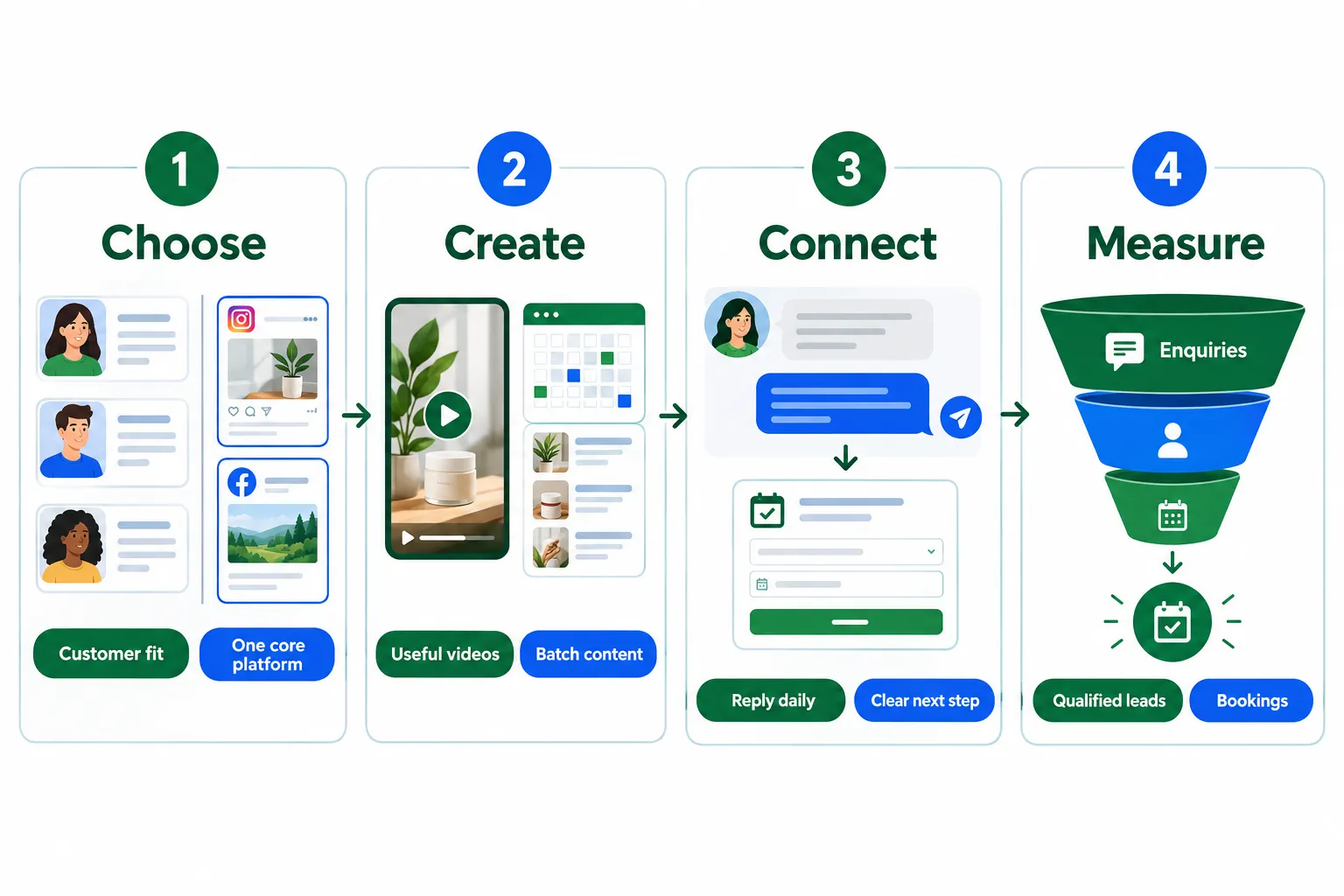
A busy social feed can hide an empty sales pipeline. Social media marketing for small business works best when posts help the right people solve a problem and take a clear next step. For owners with limited time and money, success comes from a repeatable system: choose fewer channels, share useful content, answer questions, and track what leads to sales.
Social Media Marketing for Small Business: Build Your Plan
Organic social media can build trust without an ad budget, but it still costs time. This plan keeps the workload focused. Start with one clear business goal, then connect each post to a useful action.
1. Set Goals for Social Media Marketing for Small Business
Choose one main outcome for the next 90 days. Examples include:
- Generate 15 qualified enquiries each month.
- Bring in 10 new appointment bookings.
- Drive repeat orders from existing customers.
These are sample targets, not guaranteed results. Set yours using current sales and capacity.
Next, define your ideal customer: location, needs, budget, main concerns, and reasons to buy. A local plumber needs a different strategy from an online jewellery shop.
Ask recent customers what made them choose the business. Their answers can reveal stronger content topics than a list of trending ideas.
2. Choose One or Two Platforms
Avoid opening accounts everywhere. Pick one main platform for 90 days, then add another only if the workload stays manageable.
Ask customers which networks they use to find businesses. Check website referral traffic and look at where competitors receive real questions, not just likes.
| Platform | Useful when | Content to test |
|---|---|---|
| Local customers seek updates and recommendations | Customer stories, events, helpful posts | |
| Products or services benefit from visual proof | Reels, carousels, Stories | |
| Buyers are professionals or business owners | Expert tips, case studies, founder insights | |
| TikTok | Customers respond to video-led discovery | Demonstrations, answers, behind-the-scenes clips |
For Facebook marketing, keep your Page current and join relevant community discussions where group rules allow business participation.
For Instagram marketing, show products in use, explain services through Reels, and use Stories for timely updates. Do not assume the same content will perform equally on both networks.
3. Make Profiles Ready to Convert
Before increasing reach, make sure visitors understand the offer.
Complete this profile checklist:
- Use a clear logo or professional photo.
- Explain what the business does and who it serves.
- Add the location or service area.
- Keep hours and contact details current.
- Link directly to a relevant booking, product, or enquiry page.
- Pin posts that explain the offer and answer common questions.
Use consistent names and visuals across accounts. Enable two-factor authentication and give staff only the access they need.
A good bio answers: What is offered, for whom, and what happens next?
4. Build a Simple Content Calendar
Choose three or four content themes that support customer needs:
- Education: Tips, tutorials, and answers to common questions.
- Behind the scenes: Processes, people, and product preparation.
- Proof: Reviews, case studies, and customer results.
- Offers and community: Promotions, questions, and local news.
For a first month, plan 12 posts: four educational posts, three behind-the-scenes posts, three proof posts, and two community or offer posts. Keep most content useful rather than directly promotional. A roughly 80/20 split is a starting point, not an algorithm rule.
For example, a bakery could share storage tips, show dough preparation, feature a customer celebration, and invite weekend preorders. Each calendar entry needs a topic, format, publishing date, and next step. A spreadsheet is enough.
5. Use Short Video Without Expensive Production
Short-form video deserves an early test in 2026, especially for demonstrations and visual services. It does not replace every other format; carousels and text posts can explain details well.
Start with simple clips:
- Answer one customer question.
- Demonstrate one product feature.
- Explain a common mistake.
- Show a process from start to finish.
Use a smartphone, steady framing, clear sound, and natural light. Add accurate captions so the message works without audio. Lead with the useful point rather than a long introduction. Finish with a relevant action, such as viewing the full service details.
Use original footage and audio licensed for commercial use. Obtain permission before sharing customer images or testimonials.
6. Set a Sustainable Publishing Routine
Start with about three posts per week on your main platform. This is a workable test schedule, not a minimum required for success.
A simple weekly routine could be:
- Monday: Publish a practical tip.
- Wednesday: Share a short demonstration.
- Friday: Post customer proof or a clear offer.
- Each workday: Spend 15 minutes on comments and messages.
Block three to four hours initially to batch-create content, then adjust based on production time. Schedule posts with a native tool such as Meta Business Suite.
Repurpose strong ideas, but adapt captions, crops, and calls to action for each platform. Scheduling saves time; it does not replace engagement.
7. Turn Conversations Into Trust
Reply to genuine comments and messages within one business day when possible. State response hours so customers know what to expect. Answer the question before making a sales pitch. When someone asks about a service, provide helpful details and a direct booking option.
For complaints, acknowledge the concern publicly, then move account details into a private channel. Never request sensitive information in comments.
Encourage customers to tag the business and share honest feedback. Ask permission before reposting their content. A smaller audience that asks questions and books appointments is worth more than a large audience that never acts.
8. Give Interested People a Clear Next Step
Attention alone does not produce revenue. Each sales-focused post should lead somewhere useful.
Match the action to the content:
- A service demonstration can link to a booking page.
- A product tutorial can link to that exact item.
- A buying guide can offer an email signup.
- A local event post can explain how to reserve a place.
Keep landing pages mobile-friendly and forms short. Test every link yourself.
Use trackable links with UTM tags to identify traffic from specific platforms or campaigns. Collect email addresses with clear consent so customer relationships do not depend entirely on social accounts.
9. Test Small Paid Campaigns Carefully
Paid promotion is optional, not a fix for an unclear offer. After several weeks of organic activity, review posts that brought relevant profile visits, messages, or website actions. Use promising content as a starting point for an ad test.
For example, a $10 daily budget for seven days creates a $70 test, not a promise of results. Choose a campaign goal that matches the desired outcome, such as leads or purchases.
Target a realistic service area. Avoid making audiences so narrow that delivery becomes difficult. Set a spending limit and judge cost per qualified lead, not cheap clicks alone. There is no universal cost-per-click benchmark that predicts profitability.
10. Measure Social Media Marketing for Small Business Results
Review a short scorecard each week:
| Business goal | Main metric | Supporting signals |
|---|---|---|
| Generate enquiries | Qualified leads | Messages, form submissions |
| Fill appointments | Confirmed bookings | Booking-page visits |
| Sell products | Attributed sales | Product clicks, checkout starts |
| Build repeat business | Repeat purchases | Returning customer enquiries |
Likes and views can help diagnose content performance, but they do not prove sales impact. Ask new customers how they found the business. Combine those answers with analytics, since social media may influence purchases that happen later or offline.
Calculate cost per lead = campaign spend divided by leads generated. To assess profit, also consider lead quality, sales conversion, production costs, and staff time.
11. Follow a 30-Day Launch Plan
- Week 1: Set the goal, choose a platform, complete the profile, and publish an introduction.
- Week 2: Build the calendar, batch content, and start the regular posting routine.
- Week 3: Reply daily, test calls to action, and check links and enquiries.
- Week 4: Review results, repeat useful topics, and consider a small ad test if enough evidence exists.
If there is no clear winner yet, keep testing organically rather than rushing to spend.
Final Thoughts
Effective social media marketing for small business depends on focus, useful content, and clear paths to purchase. More platforms and more posts are not always better.
Start this week: choose one network, set one measurable goal, update the profile, and plan three helpful posts. Reserve time for replies, then review leads and bookings after 30 days. Build on what customers respond to, not what merely looks popular.